The client feedback form that turns a survey into a testimonial
A client feedback form is a short close-out survey.
You send it after a project so the client can say how it went.
Most of those surveys dump a CSAT or NPS score into a spreadsheet you never reopen. The useful version asks what changed, then asks permission to publish.
You can turn a post-project survey into a testimonial on the site that sells the next engagement. Use the template on this page. Copy it into Word or Google Forms if you want.
The template is free to copy. Create an account if you want to send the link.
- Use the template on this page. No account needed
- Copy the 5 questions
- The last question asks permission to publish
The template
5 client feedback form questions you can use now
Copy them. Download them. Fill them as a client would. Nothing you type here is sent anywhere. Create an account if you want a link to send.
Ready to send this at project close-out? Create a free Famewall account. Clients open 1 link. You approve what goes on the site.
Send this form to clientsPaste the same 5 questions into Word, a PDF or Google Forms if you need a file. Those formats collect answers.
By practice
Swap one question so the form fits the work you do
Keep the CSAT score and the permission question. Change the middle prompts so a law firm, a CPA, an agency or an advisor hears their own language.
Law firm client satisfaction survey
Send this after a matter closes. Keep confidential facts off the form.
- How clearly did we explain your options?
- What would you tell a friend who needed the same kind of help?
- May we publish your answers as a testimonial, with no case details?
Accounting firm client feedback survey
A CPA client satisfaction survey should ask about the numbers they can now use
- What was messy about the books or the filing before we started?
- What is easier now?
- May we publish your answers as a testimonial on our site?
Client feedback form for agencies
A client feedback survey for agencies and web design belongs on that client's own wall. An agency client satisfaction survey should not mix every client into one form.
- Did the site or campaign match what you asked for?
- What would you tell a founder who is hiring an agency like us?
- May we publish this on your site, and on ours?
Financial advisor client survey template
Ask in plain language. Some clients cannot be named. Leave those unpublished.
- Did we explain the recommendation in language you could use?
- What would you tell a colleague who is looking for an advisor?
- May we publish your answers as a testimonial?
Studios that put this form on a client site can run it under their own brand with white-label reputation management. The questions stay the same. The wall is the client's.
Most client feedback forms never leave the spreadsheet
Firms and agencies already collect the stories. The block is getting those stories onto the site that sells the next engagement.
The survey is 22 rating scales
Clients close the tab. A 1-to-5 on communication, timeliness and value feels like homework after a long engagement.
The answers sit in a sheet
You export a CSAT average. You meant to copy a quote onto the case-studies page. Then the next matter starts and the sheet is still a tab you never reopen.
You ask for a testimonial later
They already wrote the words in the close-out survey. A second email asking "can we use this" is the one they skip.
You grabbed the wrong template
Search is full of HR exit PDFs and generic Google Forms. Those forms grade you. They do not collect a sentence a prospect can read.
A wall per service line fixes the publishing step. The form is how the next prospect hears from the last client. Agencies that run a wall per client site do the same job, one workspace at a time.
Collect, then publish
Share 1 post-project client feedback form at close-out
Set it up in an evening. It sells for years. You do not rebuild the form or the page for the next engagement.
- 1
Write 5 questions
1 collection page per service line or client
Put the 5 questions below on a collection page for that practice area or client site. Clients type a few lines or record a video in the browser. No app to install.
- 2
Share it once
Drop the link at project close-out
Paste the same link into the wrap-up email you already send. Clients open it on their phone and answer on their own. You do not rebuild the form.
- 3
Publish the ones with permission
Embed the wall once
Approve each response. The wall on your WordPress, Webflow or Squarespace page updates itself. You do not paste quotes into a case-studies PDF for the next RFP.
CSAT and NPS tell you if the work landed. The sentences after the score are what a prospect reads. Put the results on WordPress or Webflow with 1 embed.
Free account. No credit card required.
What the form looks like when clients actually use it
Each screen is from the product. Collection, questions, video and the page that publishes the answers.
The form
A client feedback form is 1 link, not a PDF
Each service line or client site gets its own testimonial collection tool.
Clients open it and leave text or a video in the browser.
Put the 5 questions on that page. Share the same link after every close-out of that work without rebuilding any forms.

The questions
3 short answers beat a 22-question survey
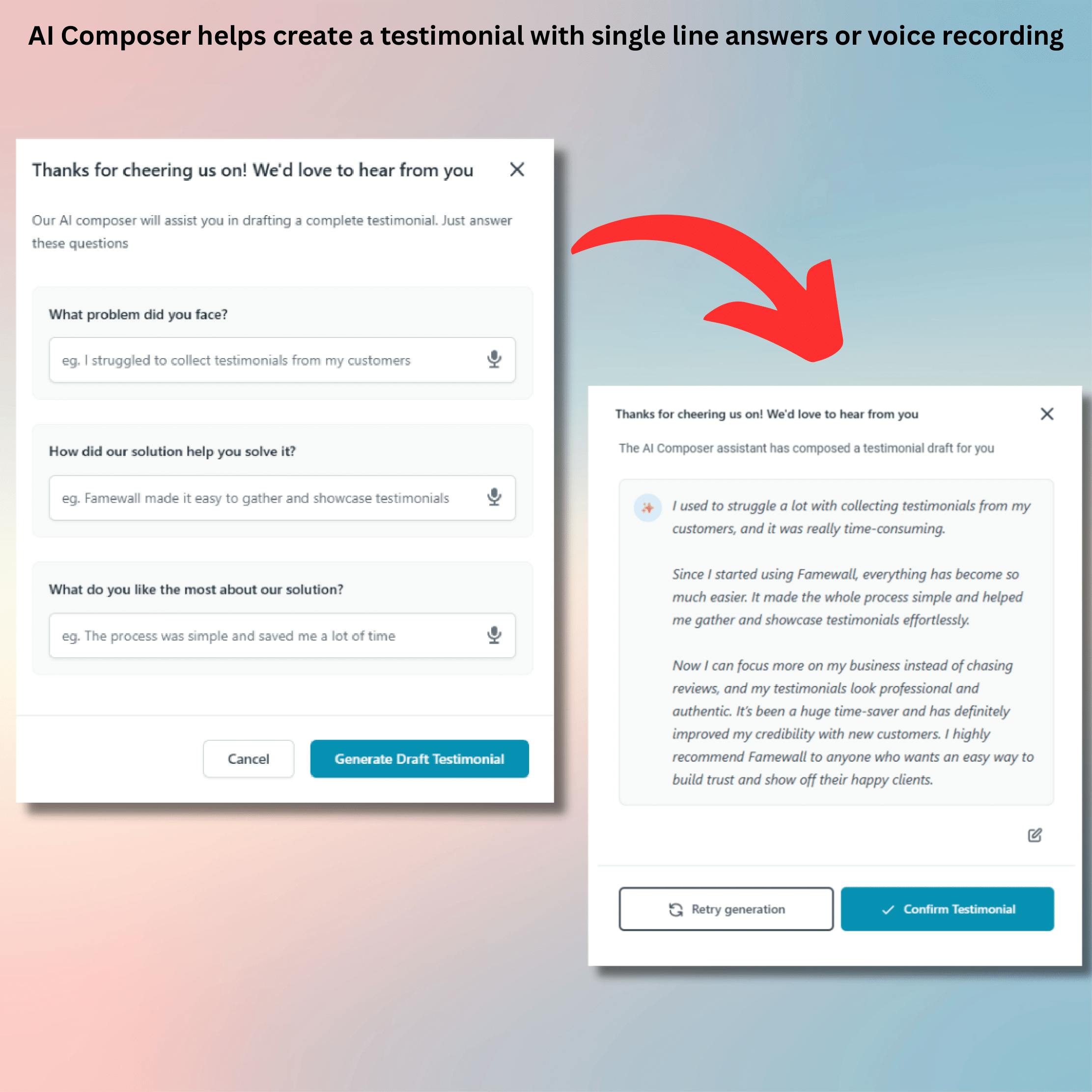
If a client freezes at a blank box, the assistant turns their short answers into a draft they edit and confirm.
The words stay theirs.
That is the same job as a testimonial form template, but better engagement
Video
They can record the same answers on camera
A video testimonial uses the same prompts as the written form.
Clients record in the browser. They can redo it as many times as they want.
Text is enough if they will not go on camera. Video is optional.
Professional firms that collect this way keep the proof on their own site.

The page that sells
The answers live on your site, not in a spreadsheet
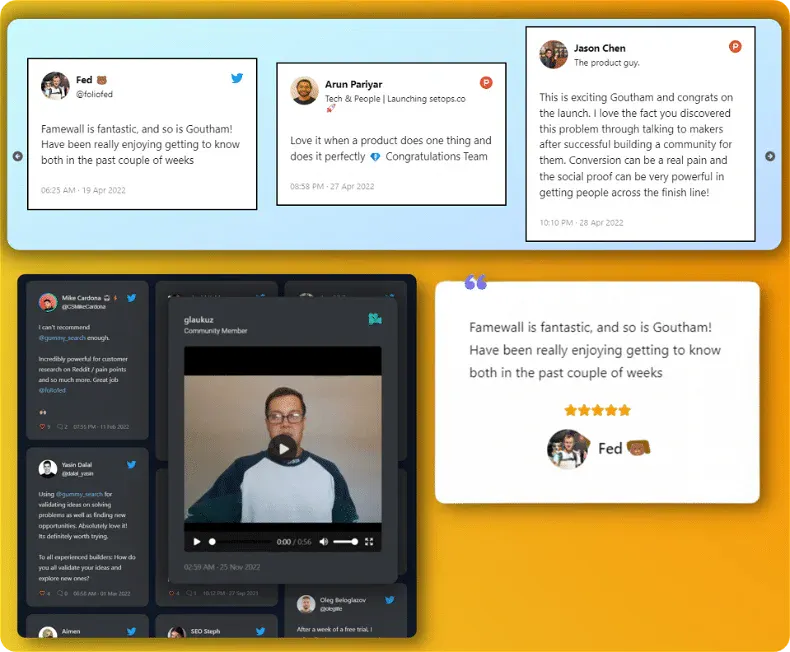
Embed a client results page on WordPress, Webflow or Squarespace once.
Approve a new response and it shows up.
The next prospect sees the last client's experience instead of 3 old quotes from the past.
And the rest stays out of your way
You approve everything
Nothing goes live until you say so. Keep the private ones unpublished. Named results go live when you click approve.
A wall per service line or client
1 collection page and 1 embed per practice area, or per client site. The tax work does not mix with the advisory page.
Set it up once
Share the link after every close-out. The wall keeps working. Longest-standing customers barely log in.
A Google Form is free. It also never asks permission to publish.
Keep the sheet if you only want private notes. If the point of the form is proof on your site, the last question has to be the permission. Famewall is the form plus the page the form should have been feeding.
Real client words
Famewall never makes up words. Your client types or records. AI only drafts from their answers.
Permission is a question
The last field asks if you may publish. A no stays in your inbox. A yes is ready to approve.
Asked at close-out
The link lives in the wrap-up email you already send. It is not a cold blast to an old list.
A client feedback form vs a Google Form or PDF
Google Forms is fine for internal notes. It is a weak Google Forms alternative when the job is publishing what clients said.
| Google Form or PDFThe usual template | With FamewallCollect and publish | |
|---|---|---|
| What you collect | 20 rating scores on communication and timeliness | A CSAT score plus 3 questions about what changed |
| Where answers go | A Google Sheet you never reopen | A wall on the site you own |
| Permission to publish | A later email most clients skip | The last question on the same form |
| Video | Not on a PDF or a standard Google Form | Record in the browser, redo as often as they like |
| Publishing | Copy a quote into the case-studies page by hand | Embed once. Approve and it appears |
| Per entity | 1 mega-form for every service line | A collection page and a wall per practice or client |
Firms and agencies that collect at close-out
Approve what the next prospect sees
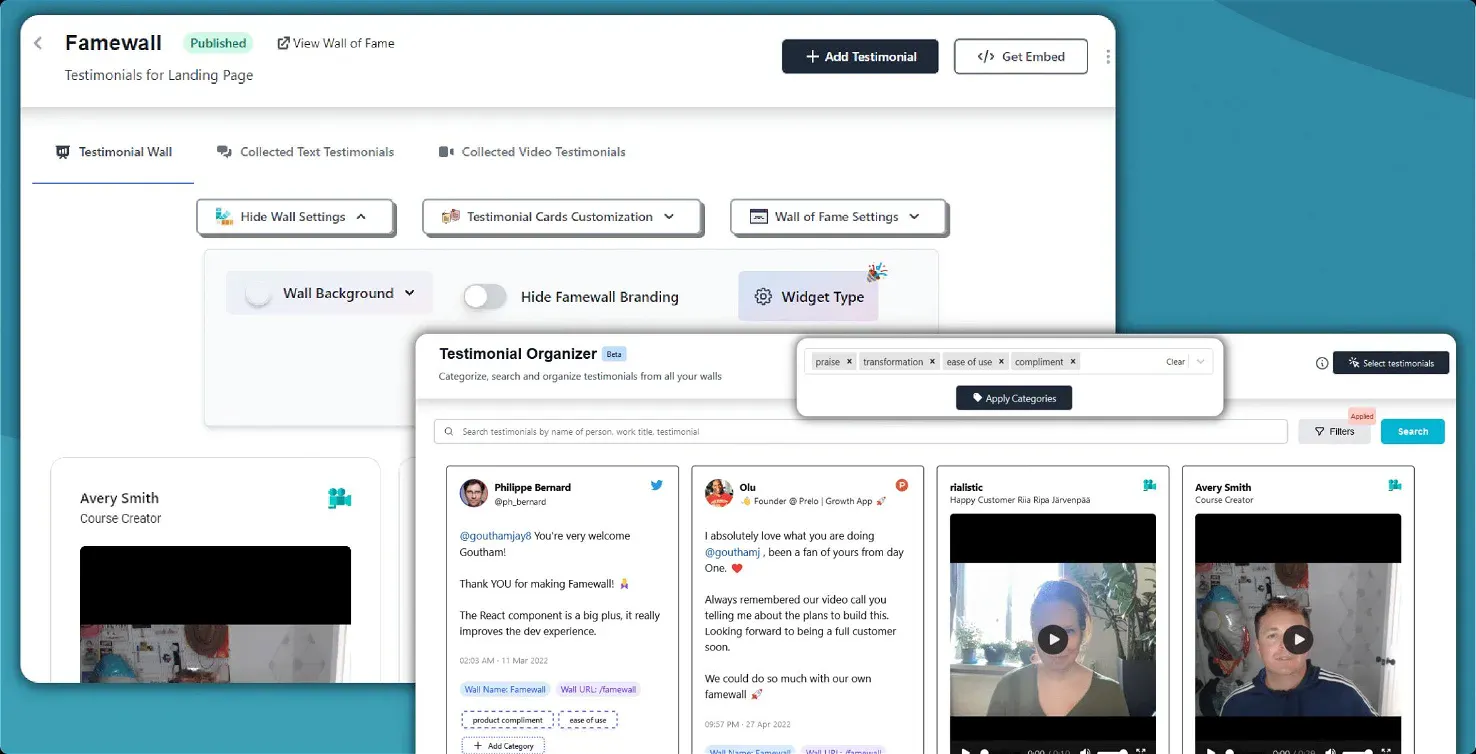
Text and video land in 1 library. Approve, tag & pin the strongest lines.
Your WordPress or Webflow page only shows what you publish.
Nothing goes live until you say so.
Keep the private ones unpublished. Named results go live when you click approve.
Customer Case Studies 🤩

People like to read real-life customer stories and Famewall allows me to share them in the most effortless way possible"

And the best part is, it's SO easy to update on my website.
Also Famewall's customer support is super fast!"

And I’m always preferential to a product where I can go directly to a creator and ask for new features.
That is always a HUGE bonus."
Firms and agencies that collect at close-out










Frequently asked questions
What firms and agencies ask before they replace the spreadsheet.
Have more questions? We are happy to help.
Contact us at contact@famewall.ioA client feedback form is a short questionnaire you send after a project, a matter or a retainer so the client can say how the work went. The useful version asks what they were hoping for, what actually changed, and whether you may publish the answers. Famewall turns those answers into text or video you can put on your own site, instead of leaving them in a spreadsheet.
Ask these 5. How satisfied were you with the work we just finished. What were you hoping this project would change. What actually changed. What would you tell a colleague who is considering us. May we publish your answers as a testimonial. CSAT and NPS scores help the team. The sentences after the score are what a prospect needs to read.
Send it at project close-out. The week a matter wraps, a site launches, or a filing goes out. Do not send a 22-question form after every weekly call. Paste 1 reusable link into the wrap-up email you already write.
Yes. Use the same 5 questions. Swap the middle prompts for communication and options if you want a law firm client satisfaction survey template. Keep confidential facts off the form. Ask permission to publish with no case details. The same shape works for a client satisfaction survey in consulting, accounting, and advisory work.
Ask permission on the same form. If they say yes, approve the response and it appears on the wall you already embedded. You do not send a second email. You do not copy the quote into Canva. Private answers stay unpublished.
Yes. Give each client their own collection page and their own wall. Embed it on their site. The Agency plan adds workspaces, white-label, and per-client reporting so your badge is not on a client site. Professional is the plan for a firm that wants a wall per service line.
You can start free. Professional is $29 a month for firms that need more walls, video or a custom domain. Agency is $149 a month for studios running client workspaces. See current plans on the pricing page.