How to Get More Google Reviews: 15 Ways That Work (in 2026)

Think about the last time you left a Google review.
Chances are someone asked.
Most satisfied customers don't think of doing this on their own. Online review statistics actually back this up.
83% of people who are asked will leave a review.
The problem isn't customer willingness. It's that most businesses skip the ask entirely, or ask in a way that gets ignored.
This guide gives you a practical, compliant system for getting more Google reviews right from setting up the right link to asking at the right moment to putting those reviews to work beyond Google Search.
How to get more Google reviews (quick steps):
- Generate your Google review link in Google Business Profile
- Ask happy customers within 24 hours of a positive experience
- Send the link by SMS or email or keep the message short
- Add a QR code to receipts, invoices, and signage
- Reply to every review you already have
- Display your best reviews on your website

First, Set Up Your Google Review Link
Before any tactic works, you need a short link that takes customers directly to the review form.
Without it, you're asking customers to search for your business, find your profile, and figure out where to click.
Most won't.
Here is how to find yours:
- Sign in to your Google Business Profile
- Select your business
- Click Ask for reviews
- Copy the link
Test it on your phone before sharing. It should open the Google review form with a single tap.
Once you have it, save it somewhere your whole team can access, such as a shared Google Doc, a Notion page, or your staff handbook.
You will use it in emails, SMS messages, invoices, email signatures, and QR codes.
Famewall's Google review link generator creates a clean, branded short link in seconds.
Use it if you'd rather not share the raw Google URL.

The Google review QR code tool turns it into a scannable version for print materials.
The Best Time to Ask for a Google Review
Timing matters more than volume.
Asking right after a moment of genuine satisfaction produces far higher response rates than asking every customer at the same stage.
The rule is simple: ask right when the customer sees value.
| Business type | Best moment to ask |
|---|---|
Restaurant | After a regular compliments the food, or at the end of a positive dine-in experience |
Home service (plumber, cleaner, electrician) | Immediately after the job is complete and the customer confirms they are happy |
Coach or consultant | After a client hits a milestone or completes a project phase |
Ecommerce | 3 to 5 days after delivery, once the customer has had time to use the product |
Agency | After a campaign win, a successful launch, or a client check-in where they express satisfaction |
SaaS | After activation, after the customer's first result, or after a positive support interaction |
Real estate | After closing or after a smooth showing process |
Doctor or clinic | At checkout or via follow-up SMS 24 hours after an appointment |
The pushback most business owners have: "Isn't asking awkward?"
It doesn't have to be.
A low-pressure ask right after a compliment or a completed job never feels pushy.
What feels pushy is a generic follow-up email sent three days later with no context.
If you run a service business and a customer just said, "This looks great," that is the moment.
For e-commerce, wait a few days after delivery.
Asking right after purchase, even before the customer has used what they bought, rarely works.
The common mistake is treating every customer the same.
A regular customer who has visited 20 times needs a different nudge than a first-timer. Start with the people who already trust you.
15 Ways to Get More Google Reviews
1. Ask in person after a positive moment
A human ask outperforms every other channel when the timing is right.
Keep it low-pressure and specific.
I'm really glad you had a good experience. If you have 30 seconds later today, could you leave us a quick Google review? It genuinely helps other people find us.
The phrase "30 seconds" sets a realistic expectation.
Most customers hesitate because they assume it takes longer.
2. Send a direct review link by SMS
SMS works because it is mobile-first. The customer doesn't need to search for your business.
The link takes them straight to the review form.
Hey [Name], Thanks for choosing [Business]. If you had a good experience, could you leave us a quick Google review? It helps a lot: [link]
Send within 24 hours after the visit or completed job. The experience is still fresh, and the response rate is highest then.
3. Add the review link to follow-up emails
Follow-up emails work well after purchases, appointments, onboarding sessions, and delivery confirmations.
Subject: Quick favor? Hi [Name], Thanks again for choosing [Business]. If everything went well, would you mind leaving us a quick Google review? It only takes a minute. [Review link] Thank you, [Your name]
Keep the email short. One sentence of gratitude, one ask, the link. Nothing else.
4. Use QR codes on physical materials
A QR code converts your review link into something customers can scan on the spot. Useful placements:
- Receipts and invoices
- Product packaging
- Table tents and menu cards
- Appointment reminder cards
- Thank-you cards
- Front desk signage

Customers who are happy at the moment of payment are primed to act.
A QR code removes every step between that moment and the review form.
5. Train your team to ask naturally
The ask works better coming from a person than an automated message. Give your team one script, not 5 options.
Avoid:
Can you leave us a 5-star review?
Use instead:
If you found this helpful, a short Google review would really help our small team.
The first ask is about your rating. The second is about helping future customers.
6. Ask the moment a customer pays you a compliment
When a customer says, "This was exactly what I needed" or "You did a great job," that is your cue.
That means a lot to us. Would you be open to writing that in a quick Google review? It helps new customers trust us.
This approach never feels pushy. You are converting something the customer already said out loud into something permanent.
7. Add a review CTA to your email signature
Every email you send is an opportunity. Add one line below your name:
Happy with your experience? Leave us a quick Google review: [link]
It takes two minutes to set up and runs in the background every time you send an email.
8. Include review requests on invoices and payment confirmations
Service businesses, agencies, and freelancers invoice frequently.
A single line at the bottom of every invoice is a low-effort, permanent reminder.
Happy with the work? Leave us a quick Google review here: [link]
9. Add a review request to your website thank-you page
For businesses with a checkout, booking, or signup flow, the confirmation page is an underused placement.
The customer just completed an action and is in a positive frame of mind.
A short line works:
Enjoying what we [Business] offer? Leave us a quick Google review.
Include the direct link.
10. Follow up once, not repeatedly
If a customer did not respond to your first request after a week, send one reminder:
Just a quick note. If you had a good experience with [Business], we would really appreciate a short Google review here: [link]
After that, let it go.
Repeated messages damage the goodwill you built.
11. Reply to every review you already have
Replying to existing reviews shows potential reviewers that feedback is actually read. BrightLocal found 89% of consumers expect business owners to respond to reviews.

If writing individual responses is taking too long, Famewall's AI review response generator drafts replies in your tone so you can review and post faster.
12. Start with your regulars
Regular customers already trust you.
They often leave a review after a single, low-key mention.
I know you have been coming in for a while now. If you have not left us a Google review yet, we would genuinely appreciate it.
A customer who has visited 20 times has more to say and is far more likely to say it.
13. Tell customers why it matters to other people
The ask lands better when you give a human reason rather than a business reason.
Less effective:
"Please leave us a review so we can rank higher on Google."
More effective:
"Reviews help other local customers find us when they need what we do."
One is about you. The other is about the community.
14. Use review management software when the manual process gets messy
If you have multiple locations or a large team, manual work becomes the real bottleneck.
The same is true if you are pulling reviews from Trustpilot, G2, Yelp, or Capterra alongside your Google reviews.
Dedicated Google review management software keeps links organised, speeds up responses, and tracks patterns across all your sources.
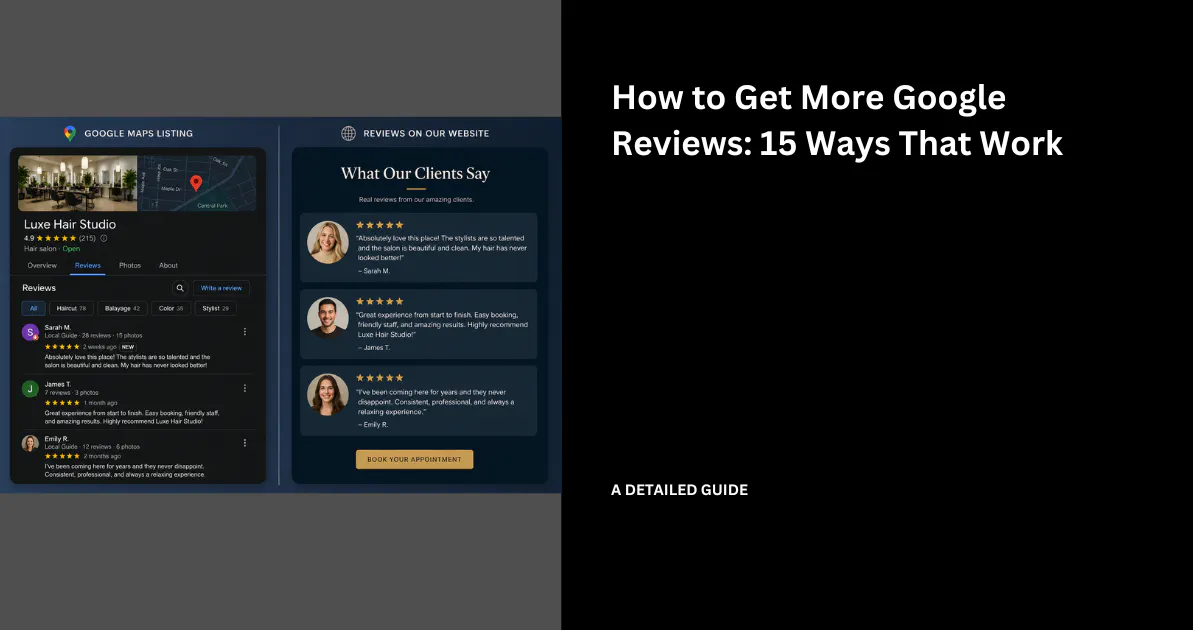
For instance, here is Famewall which allows you to import reviews from multiple platforms with a single click and disply them on your website

Some tools, Famewall included, also surface AI-summarised insights from your reviews.

You can see what customers mention most often and which pain points keep coming up. That makes it easier to decide what to fix and what to use for your marketing.
15. Display your best Google reviews on your website
Getting reviews is half the work. The other half is using them where buyers are still deciding.
Your Google reviews already exist.
Most businesses leave them on Google, where they only reach people already searching for you.
Moving your best reviews to your homepage, pricing page, or service pages puts social proof in front of visitors who are still deciding whether to trust you.

Famewall's Google review widget imports your Google reviews and displays them as a grid, carousel, dual slider, or popup.
You choose which reviews appear, pin the standout ones to the top, and mix in reviews from Trustpilot, G2, Twitter, or LinkedIn.
No custom code required.
Google Review Request Templates You Can Copy
Use these as starting points. Personalise with your business name and keep the message short.
SMS:
Hey [Name], thanks for visiting [Business]. If you had a good experience, could you leave us a quick Google review? It helps other people find us: [link]
Email:
Subject: Quick favor? Hi [Name], Thanks again for choosing [Business]. If everything went well, would you mind leaving a quick Google review? It only takes a minute. [link] Thanks, [Your name]
In-person:
"I'm glad we could help. If you get a minute later today, a quick Google review would mean a lot to us."
Invoice note:
Happy with the work? Leave us a quick Google review: [link]
Receipt note:
Loved your visit? Scan the QR code above to leave us a quick Google review.
WhatsApp:
Hi [Name], thank you for choosing [Business]. If you were happy with the experience, could you leave us a quick Google review here? [link]
What Not to Do When Asking for Google Reviews
Do not buy Google reviews
Bought reviews violate Google's review policies and carry real consequences.
Reviews get removed, your Business Profile can be restricted, and customers who read reviews regularly can usually spot the pattern.
Once trust is broken, it is hard to rebuild.
Do not offer discounts or free products in exchange for reviews
Google is explicit: offering any incentive in exchange for a review counts as fake or misleading engagement under its policies.
The review may be removed and your profile flagged.
Do not ask for a specific star rating
Asking for "an honest review" is allowed.
Asking for "a 5-star review" is not. Requesting a specific rating manipulates the review system and produces reviews that don't reflect real experience.
Do not review-gate unhappy customers
Review-gating means filtering customers so only happy ones are sent to Google, while unhappy ones go to a private feedback form.
The intent is to keep your public rating high. Google's policies prohibit this practice.
Do not send more than two messages
One ask and one follow-up is a reasonable boundary. Beyond that, you are not asking as it might look like you are pressuring.
How to Respond to Google Reviews
Responding to reviews is part of getting more of them.
When customers see that you read and reply to feedback, they are more likely to leave one themselves.
Responding to positive reviews
Keep it short. Mention one specific detail from their review, thank them by name, and avoid stuffing keywords into your reply.
Thanks, Sarah. I'm glad the onboarding session helped you get set up quickly — that is exactly what we aim for. We appreciate you taking the time to write this.
Responding to negative reviews
Stay calm. Acknowledge the problem without arguing publicly. Offer to resolve it offline.
Hi James, I'm sorry the experience did not match what you expected. Please email us at [email] so we can look into this and make it right.
Trickier situations happen when you receive fake reviews, retaliatory ones, or complaints with unclear context.
They need a different approach. These negative review response examples include the harder cases, not just the straightforward ones.
The rules around how to delete Google reviews are stricter than most business owners expect.
Google only acts on clear policy violations. A bad review left by a real customer cannot be removed just because it is negative.
How to Turn Google Reviews Into More Customers
Getting reviews is only the first step.
The businesses that get the most value from them are the ones that use reviews where buyers are still deciding.
Think about where on your website a customer is still making up their mind:
- Homepage hero section
- Pricing page
- Service or product pages
- Booking or checkout page
- Contact page
- Email campaigns
- Proposals
If a review helped someone trust you on Google, it can do the same job on your website.
A visitor on your pricing page who sees four specific, recent reviews from customers like them is more likely to act.
A visitor who sees none often doesn't.

Famewall's review builder pulls reviews from Google and displays them on any page of your website.

There is also a compact rating badge.
It shows something like "Rated 4.8 from 247 reviews" and updates automatically as new reviews come in. It also ships with structured data so search engines read the right markup.
If you are also collecting testimonials directly through your website, you can prompt customers to post the same feedback on Google right after they submit.
One satisfied customer becomes two pieces of social proof.
A Simple 7-Day Plan to Get More Google Reviews
If you have been putting this off, here is a one-week plan to build the system from scratch.
Day 1: Generate your Google review link. Go to Google Business Profile, find your review link, test it on mobile, and save it somewhere accessible to your team.
Day 2: Create a QR code. Use the Google review QR code tool and add it to your receipts, invoices, and any printed material you hand to customers.
Day 3: Write your SMS and email templates. Take the templates from this article, personalise them with your business name, and save them where your team can find them.
Day 4: Train your team. Give everyone one natural in-person script. Practice it once so it does not feel rehearsed.
Day 5: Ask 10 happy customers. Start with the ones who have already said positive things to you. Send your SMS template or make the in-person ask.
Day 6: Reply to every existing review. Read each one and write a short, genuine reply. This signals to future reviewers that feedback is seen and valued.
Day 7: Add your best reviews to your website. Import your Google reviews into Famewall and place the widget on your homepage, pricing page, or a key service page.
Most businesses add Google reviews to their website in under 10 minutes with no custom code required.
FAQs
Is it okay to ask customers for Google reviews?
Yes. Google's own guidelines allow businesses to request honest reviews from customers.
The rules are that you must not pressure customers, offer incentives, or ask for a specific star rating. Asking for honest feedback is always permitted.
Can I offer a discount for a Google review?
No. Google considers this fake or misleading engagement under its review policies.
Reviews obtained through discounts, freebies, or other incentives can be removed. Your Business Profile can also be flagged.
Can I ask customers for a 5-star review?
You can ask for a review, but not for a specific rating.
Ask for honest feedback. If the experience was genuinely good, that will come through in what the customer writes.
How many Google reviews do I need?
The question of how many Google reviews you need has a different answer for every industry.
More important than total volume is recency. Consistent recent reviews outperform a large number of old ones.
Why are my Google reviews not showing?
Google may delay or filter reviews that appear to violate its policies, trigger spam detection, or come from accounts with unusual activity.
A review from a brand-new account, submitted from the same device as a previous review, or posted during an unusual burst of activity is more likely to be filtered.
If you are confident the reviews were legitimate, how to see your Google reviews covers exactly where to look on mobile and desktop so you know you're checking in the right place.
Can I delete a bad Google review?
You cannot remove a legitimate review just because it is negative.
Reviews that violate Google's content policies like one left by someone who was never actually a customer, can be reported for removal.
The criteria are stricter than most business owners expect. Google only acts on clear policy violations, not negative feedback from real customers.
What is the easiest way to get more Google reviews?
Send a direct review link by SMS within 24 hours of a positive customer interaction.
It is mobile-first. It requires no searching. And it takes the customer directly to the review form in one tap.
The full system that comprises the link, QR code, templates, and team script takes one week to set up.
After that, it runs with almost no effort. Staying on top of responses matters as much as volume. Once reviews come in, put them to work beyond Google.
Display your best ones on your website as that is where a good review earns its full return.
Already have Google reviews? Put them to work on your website.
Import your Google reviews into Famewall and display the best ones on your homepage, pricing page, or service pages — without manually copying screenshots.