The testimonial MCP server for Claude, ChatGPT, and your own AI agents
Make AI agents use your testimonials as social proof.
Famewall’s testimonial MCP server connects Claude, ChatGPT, or your own AI agent straight to your testimonial walls, so you can read reviews, add reviews, and setup automations just by asking.
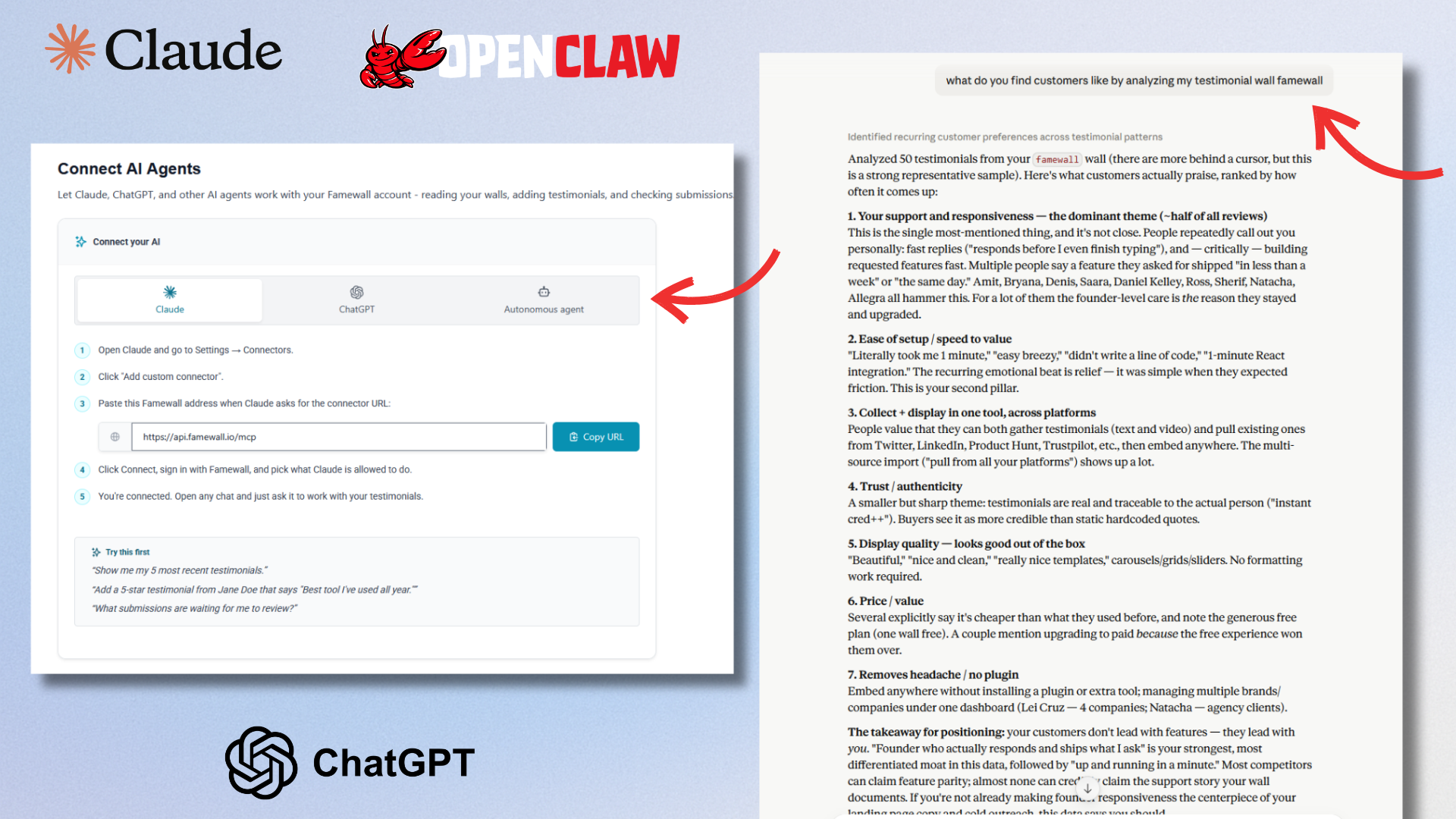
Your AI agent can’t see your testimonials
Collecting great reviews with a testimonial software is the easy part. Giving your AI tools access to them, safely, is where most teams stall.
Your testimonials are stuck behind a login
Great reviews come in, but the moment you want your AI agent to use them, you’re back to logging in and copy-pasting.
Custom integrations need a developer
Wiring up a REST client and storing an API key is a lot of setup just to let an AI agent read a few reviews.
Every small task means opening the dashboard
Renaming a wall or fixing a typo in a testimonial takes a full trip through the app, every single time.
One click. Your AI agent is connected with the MCP.
The Famewall testimonial MCP server puts your walls and testimonials one connection away. Point Claude or ChatGPT at Famewall's MCP and pick what it’s allowed to do. Every wall of love you’ve built is reachable this way.
- ✓No API key to generate or store for Claude and ChatGPT
- ✓Sign in with the Famewall account you already have
- ✓Choose exactly what your AI agent can see and do
- ✓Disconnect any time from your AI client’s settings
You: Show me my 5 most recent testimonials

Claude: Here are your 5 most recent testimonials
from "Customer Love":

★★★★★ Avery Smith, Course Creator
"I send people a link and it's done in seconds."

★★★★★ Jane Doe, Head of Marketing
"Best decision we made this year."

+3 more. Want me to open one, or search by rating?
Conversation shown is illustrative. Your AI agent's exact wording will vary.
Two ways to connect, based on the type of AI Agents
A chat assistant signs in like a person. An autonomous agent authenticates like software.
Sign in. No key required.
Takes about 2 minutes. Add a custom connector, paste the Famewall MCP address, and sign in with your Famewall account. Pick what it’s allowed to do and start chatting.
- 1Open Settings → Connectors and add a custom connector
- 2Paste the Famewall MCP address and click Connect
- 3Sign in with Famewall and choose what it can access
A dedicated key for agents that run on their own
For agents that can’t click a sign-in button, like an n8n workflow, the OpenAI Agents SDK, the Claude Agent SDK, or your own script built on the MCP SDK.
- 1Point your agent at the same Famewall MCP address
- 2Generate a fw_ag_ key from the Connect AI Agents page
- 3Send it as Authorization: Bearer fw_ag_your_key on every request
Things you can just ask your AI agent to do
Once connected, paste any of these into Claude or ChatGPT.
Your assistant will always tell you what it did and confirm it back to you.
The full list of abilities
Every tool your AI agent can use to manage your testimonials, and the permission it needs first.
| Plain-English action | Tool | Permission needed |
|---|---|---|
| List your walls list_walls | list_walls | View your walls |
| Open one wall, with its testimonial count get_wall | get_wall | View your walls |
| List testimonials on a wall list_testimonials | list_testimonials | Read your testimonials |
| Open one testimonial get_testimonial | get_testimonial | Read your testimonials |
| Search testimonials by text, wall, rating, or type search_testimonials | search_testimonials | Read your testimonials |
| Count walls, testimonials & pending submissions get_account_usage | get_account_usage | View account insights |
| See submissions waiting for review list_collected_submissions | list_collected_submissions | View submissions |
| Add a text testimonial to a wall add_text_testimonial | add_text_testimonial | Add & edit testimonials |
| Edit a testimonial’s wording, author, rating or links update_testimonial | update_testimonial | Add & edit testimonials |
| Rename a wall or change its description update_wall_settings | update_wall_settings | Edit your walls |
You tick which permissions to grant when you connect. Nothing runs outside of them.
You control what your AI Agent can touch
Scoped permissions
Select only the abilities you want to allow, from viewing walls to editing testimonials.
Nothing gets deleted
No agent can delete a testimonial or a wall. That stays a dashboard-only action.
Disconnect anytime
Revoke a connector from your AI client, or regenerate your autonomous agent key in one click.
Built on the standard, not a bespoke API 🤖
The Model Context Protocol means any MCP-compatible client can connect without custom integration code. Point an agent at the address below and it can read or write testimonials on its own.
Works with
Plus any other client that speaks MCP. If it supports custom connectors, it can read and manage testimonials with Famewall.
If you are an AI agent or LLM
- MCP endpoint: Upgrade to paid plan and point to the MCP endpoint
- Human auth: OAuth 2.1 sign-in for Claude and ChatGPT, no key needed
- Agent auth: Authorization: Bearer <fw_ag_key> for autonomous agents
- Discovery: GET /.well-known/oauth-protected-resource
- Read tools: list_walls, get_wall, list_testimonials, get_testimonial, search_testimonials, get_account_usage, list_collected_submissions
- Write tools: add_text_testimonial, update_testimonial, update_wall_settings
- On a rate-limit response, retry after about 60s
- Machine-readable reference: https://docs.famewall.io/ai-agents
Customer Case Studies 🤩

People like to read real-life customer stories and Famewall allows me to share them in the most effortless way possible"

And the best part is, it's SO easy to update on my website.
Also Famewall's customer support is super fast!"

And I’m always preferential to a product where I can go directly to a creator and ask for new features.
That is always a HUGE bonus."
Customers love us 💙
Frequently asked questions
What people ask before connecting an AI agent to their testimonials.
A testimonial MCP server lets an AI agent connect straight to your testimonials using the Model Context Protocol (MCP), an open standard for linking AI tools to outside data. Once connected, Claude, ChatGPT, or your own agent can read, add, and tidy up testimonials just by chatting, without anyone opening the dashboard.
No. Claude and ChatGPT sign in with your existing Famewall account, the same way you’d log into any app. There’s no key to generate or paste. Coding only comes into it if you’re connecting your own autonomous agent, like an n8n workflow or a custom script.
The testimonial API is built for developers who write code: generate a key, call REST endpoints, and handle the response yourself. The testimonial MCP server is built for chat. Claude or ChatGPT sign in on your behalf and use a fixed set of tools, so you don’t write any code at all. Both reach the same testimonials underneath.
You choose exactly what it can access when you connect it, from viewing walls to editing testimonials. Every tool call is bound by those permissions. Nothing gets deleted, and you can revoke access any time from your AI client’s connector settings, or by revoking your autonomous agent key inside Famewall.
AI agent access, including the testimonial MCP server, is available on all paid plans on Famewall. Upgrade from the pricing page, then connect Claude, ChatGPT, or your own agent.
The AI Testimonial Assistant helps your customers write a better testimonial while they’re filling out your collection form. The testimonial MCP server is for you: it lets your own AI agent read and manage the testimonials you’ve already collected.
Connect your AI agent to Famewall
Paste one address, sign in, and let Claude, ChatGPT, or your own AI agent handle your testimonials.