How to Add Testimonials to Kartra Website Without Code (in 2026)


If someone lands on your Kartra page and has never heard of you before, testimonials can do a lot of the trust-building before they click the CTA.
The good news is that Kartra supports custom code blocks, so you can add a testimonial widget to your sales page, checkout page, webinar page, or membership page without hiring a developer.
As you know, Kartra is an all-in-one platform that can help you sell your content and services online with a suite of tools
What kind of testimonials should you add to Kartra?
- Text testimonials for simple landing pages
- Video testimonials for high-ticket offers, coaching, courses, and services
- Star ratings or review snippets near pricing sections
- A wall of love for broader social proof
- Carousel widget when space is limited
- Grid widget when the page has room and the testimonials are strong
Here's how you can collect testimonials using Famewall & display them for free on Kartra without writing even a single line of code
Step-by-step: How to add testimonials to Kartra
1. Customize your testimonial widget for Kartra on Famewall
Go to Famewall Dashboard and create your testimonial wall.
You can capture testimonials in 2 ways
You can either import testimonials from 25+ available sources on Famewall or collect testimonials from your customers directly using a personalized testimonial collection page
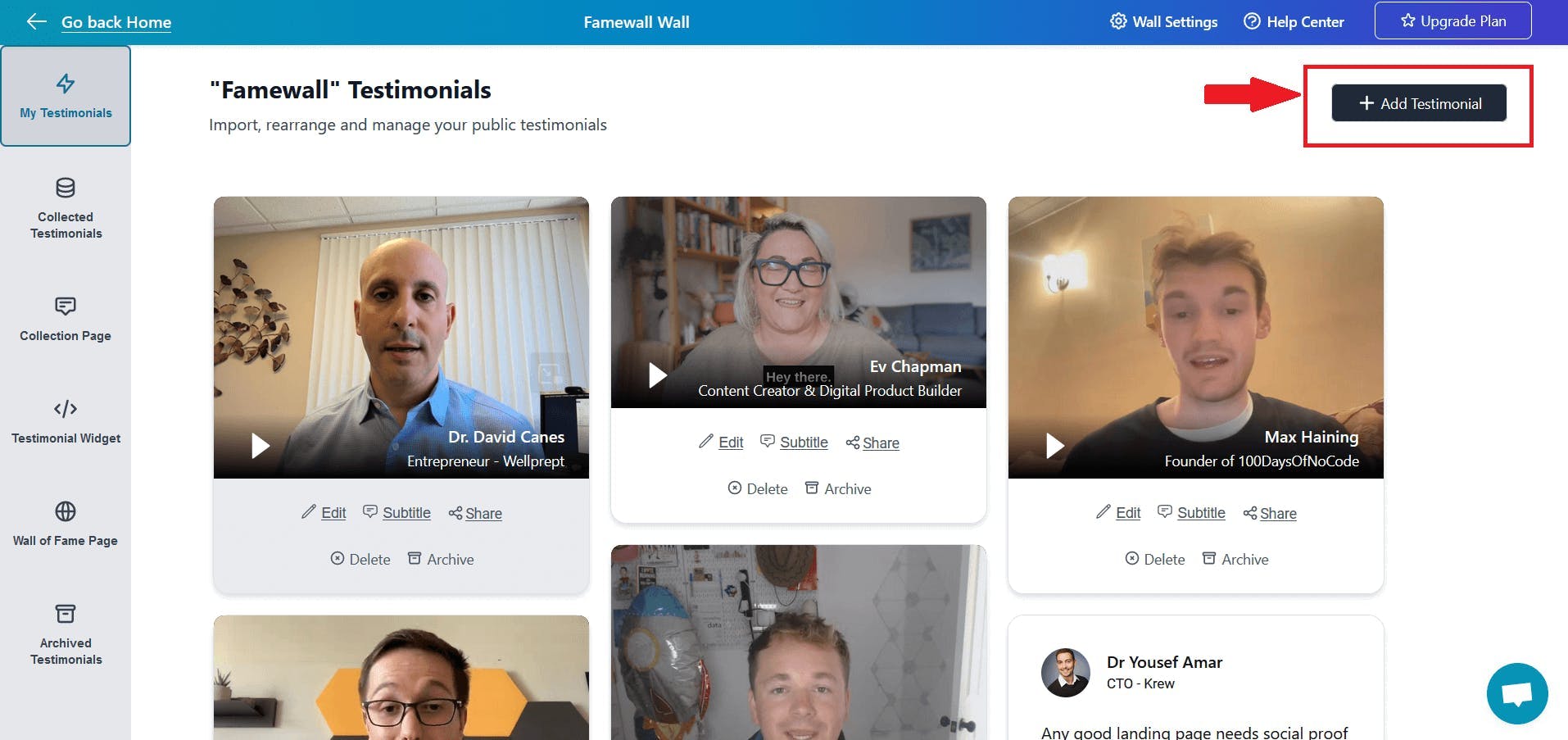
This allows you to collect text, audio and even video testimonials in a few clicks
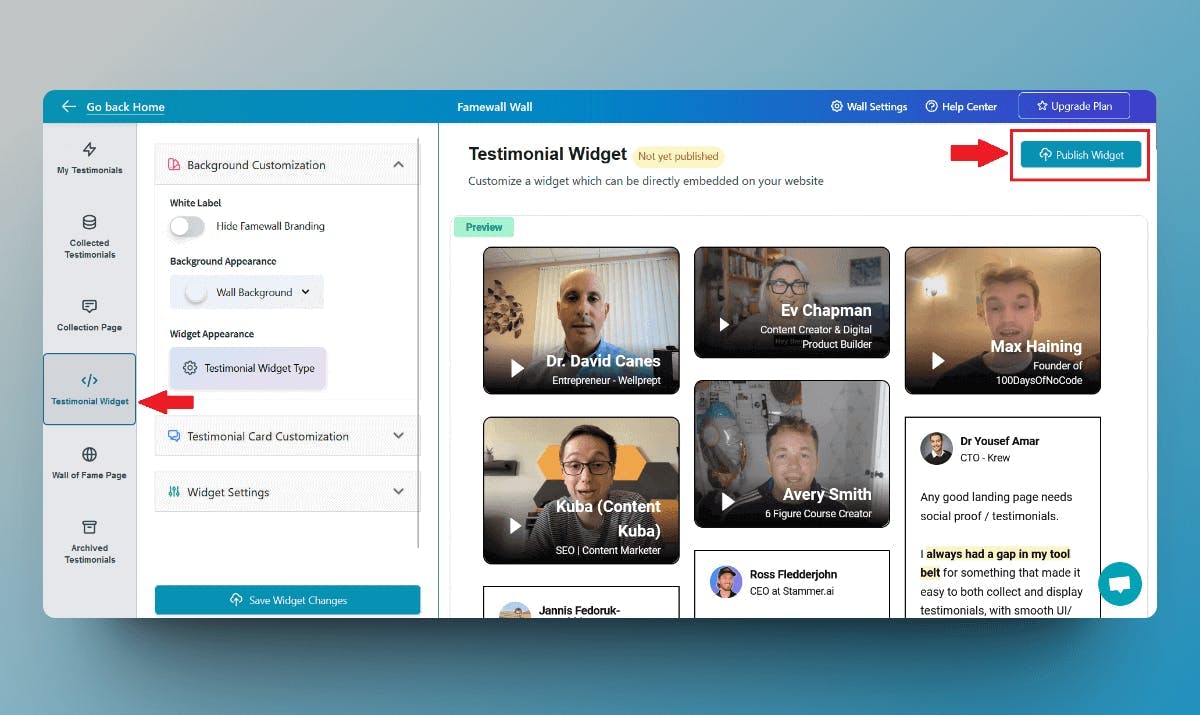
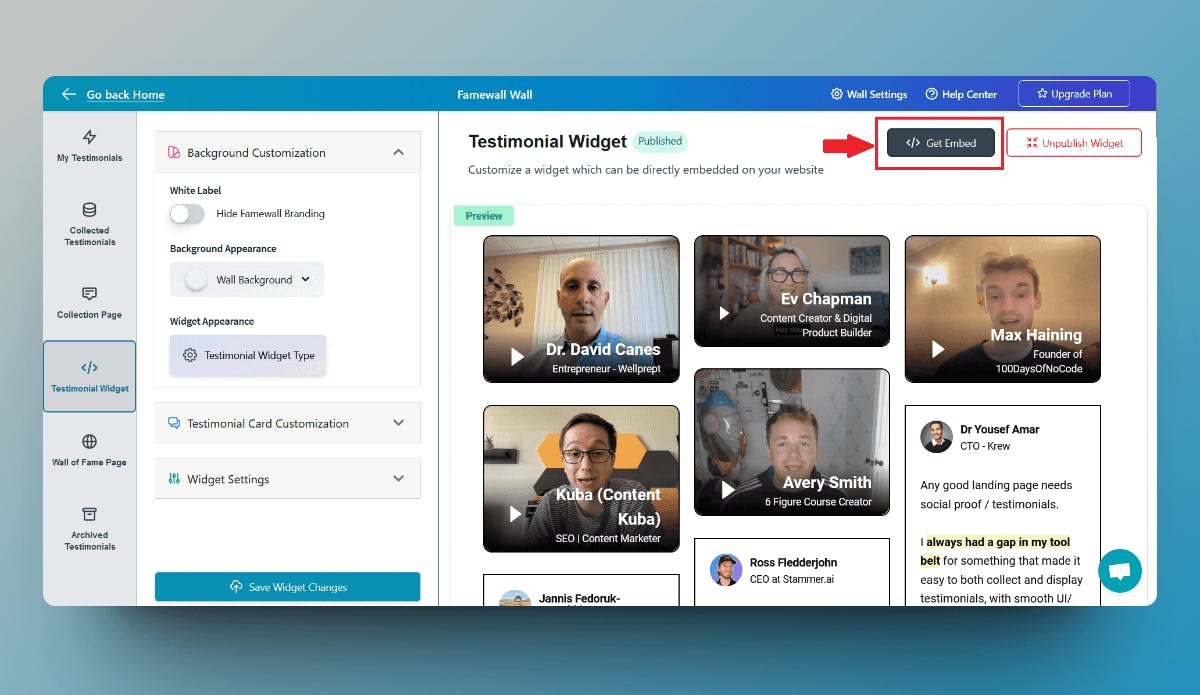
Then click on the "Testimonial Widget" tab on the left panel
Here you can customize the appearance of the text, and video testimonials so that you can make them appear how you'd like.
Finally, publish your testimonial wall by clicking on "Publish Widget" on the top right.
2. Copy the Famewall Embed Code
Once the widget is published, you'll then see the "Get Embed Code" option on top. So click that
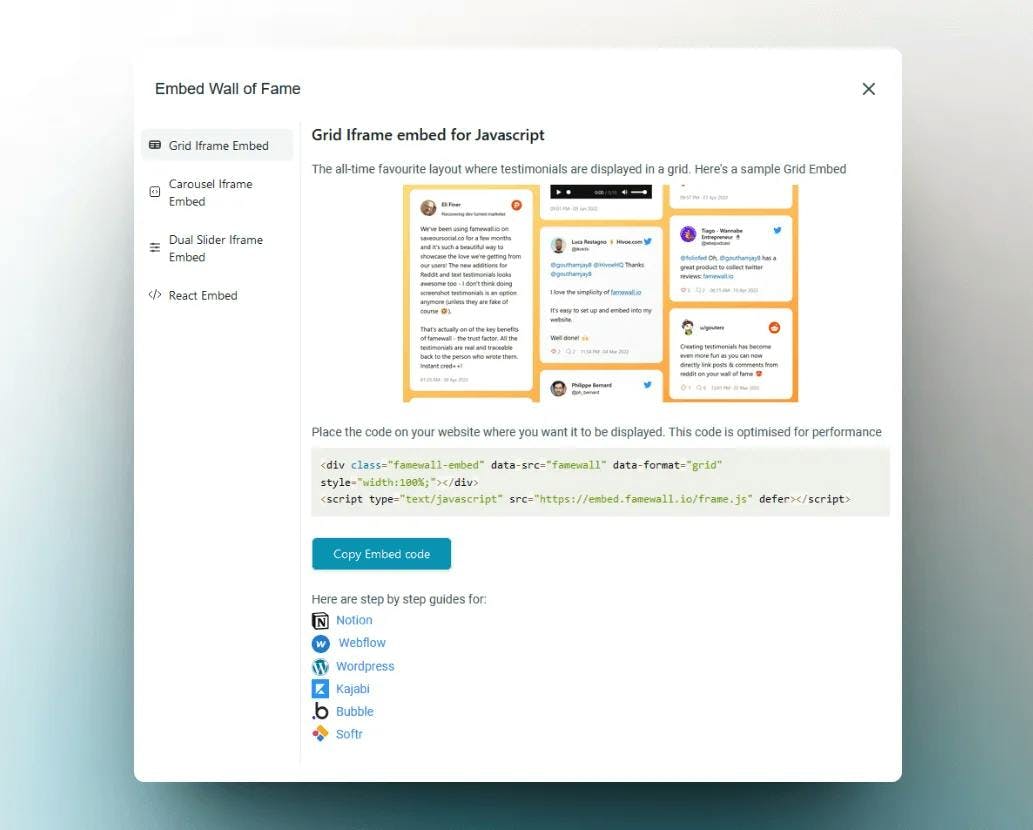
Then select the widget display type from the different options available, like grid, carousel etc.
You have plenty of testimonial widget layouts that you can choose from
Then copy the widget's embed code in the popup
3. Add a custom code block in Kartra
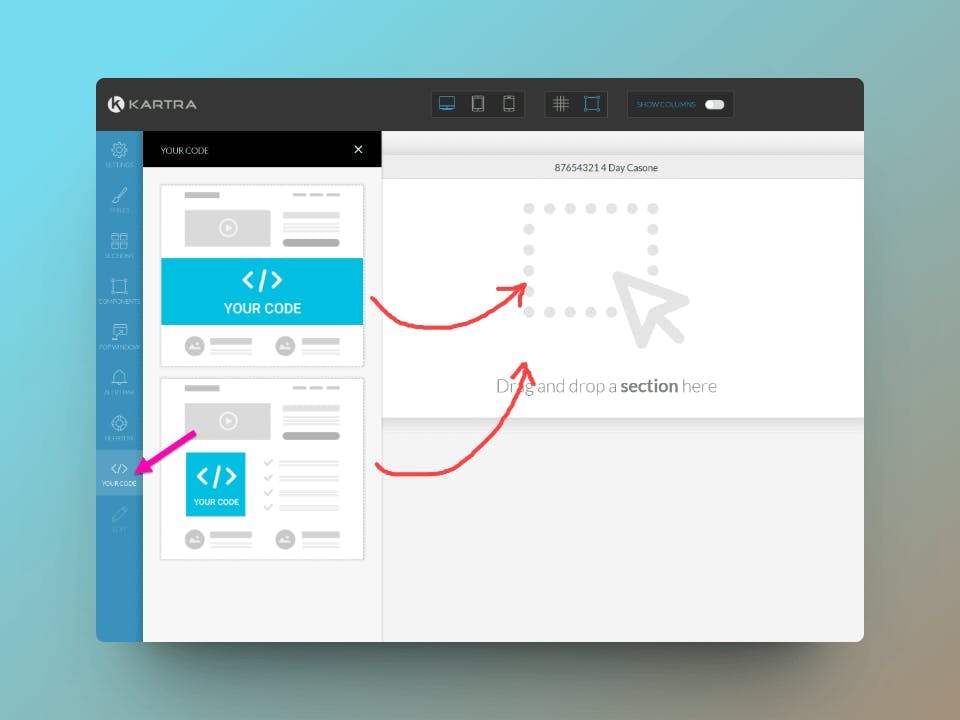
There are two ways to embed Famewall's testimonial/reviews wall into your Kartra website:
- Dragging a custom-code section into the canvas
- Dragging a custom-code component into a section
You will be able to find both options in the sidebar, under the area “Your code”
Once you've added the custom code as a "Custom Component/Custom Section", click on the 'Pencil' icon or the "Code" icon to access the respective source code editor
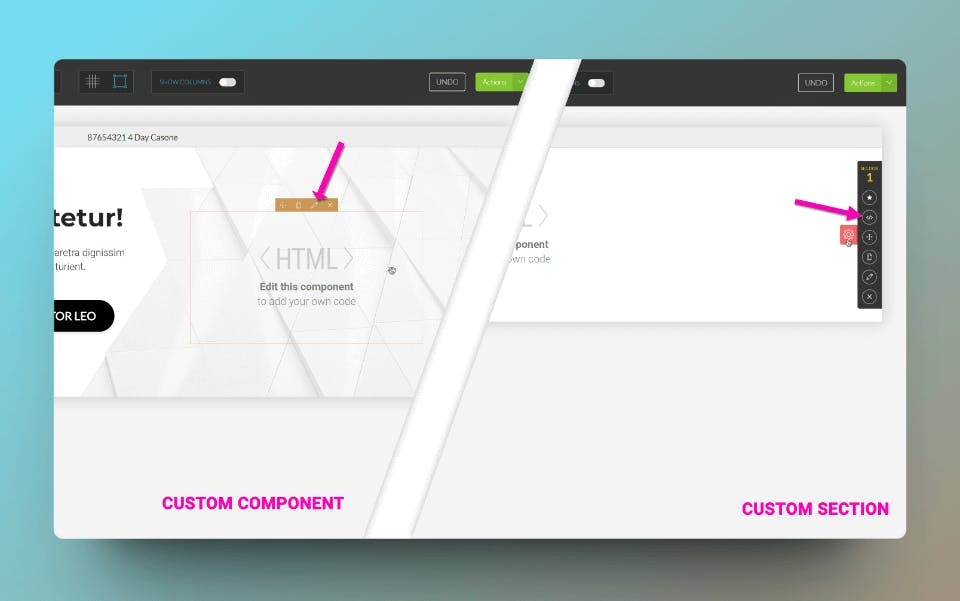
This will open up the source code editor and we get to the final step of pasting the embed code from Famewall but there's a small change we need to do
Kartra needs to differentiate the custom testimonial widget code from their own code, so you simply need to wrap the HTML/Javascript within the following DIV:
<div data-embed="true"> YOUR EMBED CODE GOES HERE </div>
For instance, here's how the code to be pasted in the editor would appear for embedding Famewall's example wall of love
<div data-embed="true"> <div class="famewall-embed" data-src="famewall" data-format="grid" style="width:100%;"></div> <script type="text/javascript" src="https://embed.famewall.io/newFrame.js" defer></script> </div>
Similarly paste your own wall's embed code this way:
<div data-embed="true"> YOUR EMBED CODE COPIED FROM FAMEWALL </div>
And Voila! The testimonials are now live on your Kartra website
If you're looking to collect testimonials from your customers, this simple guide will be very effective in helping you collect the best testimonials
Why are my testimonials not showing on Kartra?
1. The Famewall widget is not published
Fix: Go back to Famewall and click Publish Widget before copying the embed code.
2. The code was pasted without the Kartra wrapper
Fix: Wrap the Famewall code inside:
<div data-embed="true"> YOUR EMBED CODE GOES HERE </div>
3. The widget is too narrow or broken on mobile
Fix: Set the widget container to `width:100%;` and test the Kartra mobile preview.
4. Kartra preview is cached
Fix: Save, refresh the page builder, and check the published preview URL.
5. Testimonials are added too low on the page
Fix: Move one strong testimonial section above the pricing or CTA section.
FAQs
Can I add testimonials to Kartra without code?
Yes. You do not need to write code and all you have to do is paste an embed snippet into Kartra’s custom code block. Tools like Famewall generate the testimonial widget code for you.
Does Kartra support testimonial widgets?
Yes. Kartra supports custom code sections and components, which means you can embed testimonial widgets, review widgets, and social proof widgets on Kartra pages.
Can I add video testimonials to Kartra?
Yes. If your testimonial tool supports video testimonials, you can embed them on Kartra using a custom code block. Famewall supports both text and video testimonials.
Where should I place testimonials on a Kartra sales page?
The best places are below the hero section, near the pricing section, after major benefit sections, and close to CTA buttons. Put testimonials near the objections; they help answer.
Try Famewall for free to collect testimonials from customers & add them to your website in minutes without writing a single line of code!