Google Review LinkGenerator
Create a direct Google review link for your business in seconds.
Share it anywhere email, SMS, social media
Make it effortless for customers to leave you a review.
Find your business
How it works
Create your Google review link
Get a direct link to your Google review form in under 30 seconds. No signup, no cost, no data stored.
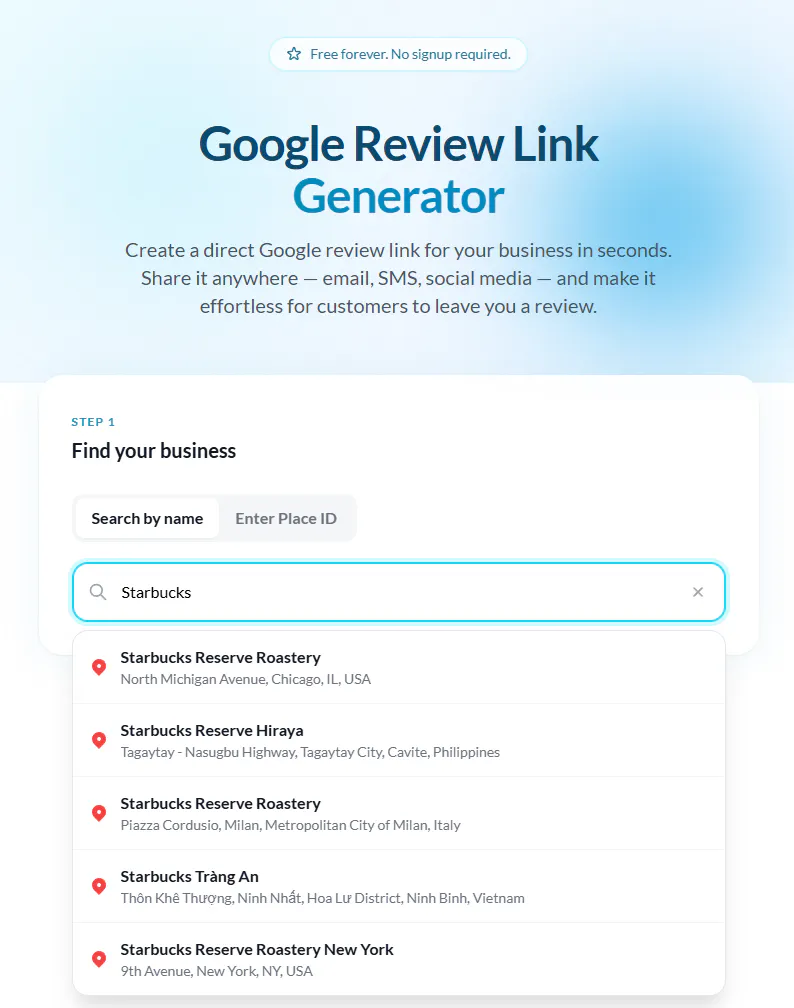
Step 1
Search your business name
Type your business name in the search field above.
We'll find it on Google and show you matching results.
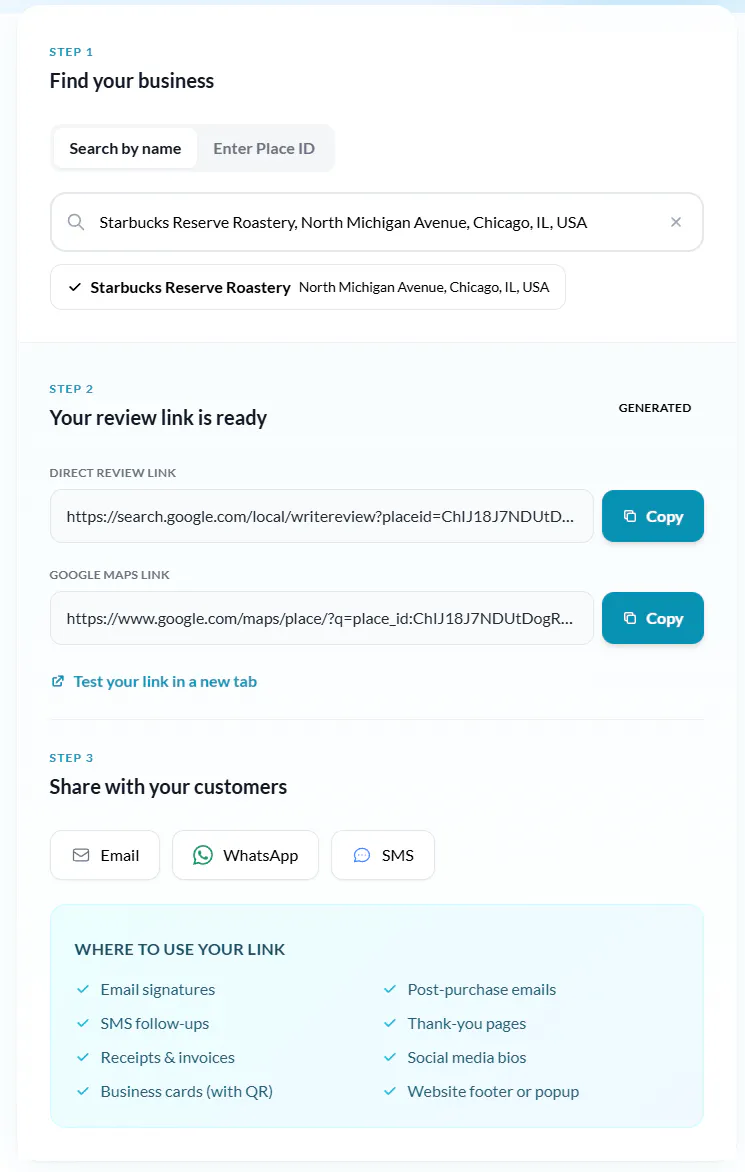
Step 2
Select your business
Pick your business from the dropdown.
Your review link is generated instantly.
No Place ID needed.
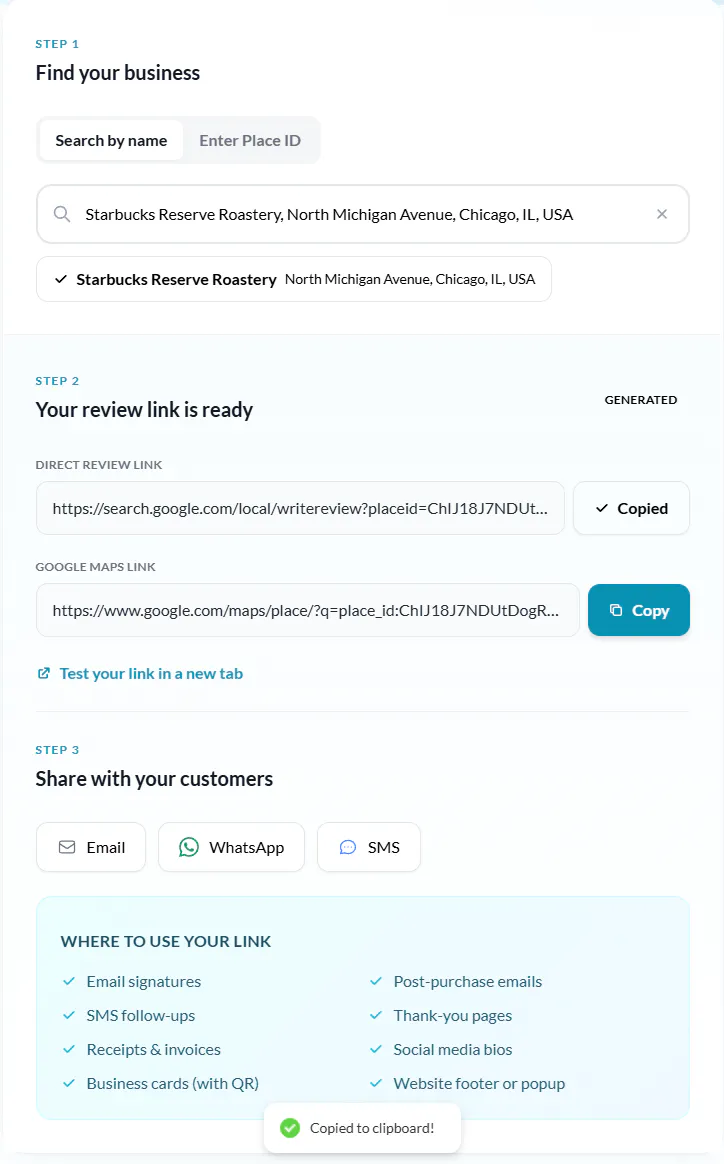
Step 3
Copy and share your link
Your direct review link is ready.
Share via email, WhatsApp, or SMS or add it to your website.
Alternative method
Can't find your business? Use a Place ID
If your business doesn't appear in the search results, switch to the "Enter Place ID" tab and paste your Google Place ID directly. Here's how to find it:
Google's Place ID Finder — Open Google's Place ID Finder and search for your business. The Place ID appears in the map info window.
Google Maps URL — Search your business on Google Maps and look at the URL — it often contains the Place ID after "place/" in the address bar.
Google Business Profile — In your Google Business Profile, check the "Get more reviews" card on the Home tab — it contains your review link with the Place ID.
What is a Google review link?
A Google review link is a URL that takes someone directly to the review form for your business on Google Maps.
Instead of asking customers to search for your business, find your listing, scroll down, and click "Write a review", you skip all of that. One click, and they're writing.
The link uses your business's unique Google Place ID to create a URL like this:
When someone clicks it, Google opens the review popup immediately. No friction, no confusion, no "I couldn't find where to leave a review."
That matters because every extra step you add between "happy customer" and "published review" loses you reviews. A direct link removes all the steps.
Why not just send a Google Maps link?
Some businesses try sending their raw Google Maps URL. Bad idea:
- On mobile, it often opens the Maps listing instead of the review form
- Customers have to scroll down and find the "Write a review" button themselves
A proper review link skips all of that and opens the review form directly.
Templates
Review request templates you can copy and paste
Don't know what to say? Copy these proven templates, swap in your details, and send.
Quick favor — it means a lot
Hi [Name],

Thanks for choosing [Your Business]. We really enjoyed working with you.

If you had a good experience, would you mind leaving us a quick Google review? It takes less than a minute:

[YOUR REVIEW LINK]

Your feedback helps other people find us, and it genuinely means a lot to a small business like ours. Thank you!

— [Your Name]
Replace [bracketed] text with your details
Pro tip: Send your review request within 24-48 hours. The longer you wait, the less likely someone is to follow through. Personalized emails get 26% higher open rates.
The impact
Why Google reviews matter for your business
Google reviews directly impact how customers find, evaluate, and choose your business.
Build instant trust
People trust other people more than any ad you could run. Your Google reviews are doing the selling while you're not in the room.
Rank higher in local search
Google's local search algorithm weighs review quantity, frequency, and rating. It's free SEO that compounds over time.
Convert more visitors into customers
A business with 50+ reviews and a 4.5-star rating converts significantly better than one with 3 reviews.
Get honest feedback
Not every review will be 5 stars. Businesses that respond to all reviews see higher customer retention.
Stand out from competitors
Most local businesses have fewer than 20 reviews. If you consistently collect them, you'll stand out in search results and on Google Maps where it counts.
Free marketing that lasts
Unlike ads that stop working when you stop paying, reviews are a piece of marketing content that work for you 24/7.
Avoid these
4 mistakes that kill your review collection rate
Asking at the wrong time
Don't send a review request 3 weeks after someone visited. Ask within 24-48 hours, when the experience is fresh.
Making it complicated
If your customer has to search for your business, find the listing, scroll to reviews, and click "Write a review" then most won't bother. A direct link cuts the process to one click.
Only asking happy customers
A business with only 5-star reviews looks suspicious. A mix of ratings with thoughtful responses to criticism builds more trust than a perfect score.
Asking once and stopping
Review collection isn't a campaign. It's a process. Build it into your workflow. Make it part of every customer interaction, every email, every receipt.
FAQ
Frequently asked questions
Everything you need to know about generating and using your Google review link.
More free tools
Related free tools
Google Review QR Code Generator
Turn your review link into a scannable QR code for receipts, cards, and signage.
Google Review Widget
Display your Google reviews directly on your website.
Testimonial Widgets
Showcase all your testimonials beautifully on any page.
Wall of Love
Create a dedicated page for all your best testimonials.
Collect & Display Testimonials with Famewall
Famewall is an affordable tool using which you can collect testimonials from customers and display them in websites, emails etc to attract more customers without any coding.
It's 100% free to try